Saturday, August 31, 2013

Will Call Of Duty Ghosts Save The Series?


call-of-duty-ghosts-19880-1920x1200
I’m a big fan of the Call Of Duty (COD) series ever since Call Of Duty 2 came out. Since then I have played them all on PC. But if you follow the stories as I do you may be aware that COD has had its roadblocks that have made loyal players wonder if they should even bother with the next version. Sure COD continues to sell copies at record pace but the love for the game seems to be slowing down ever since Activision, the creator of the COD series, decided to make some changes that forever ruined the game, at least in my opinion.

One of the things that made the game so awesome to play was the dedicated servers. Servers that were controlled by people as opposed to the creators of the game as they are today. With control over their servers the owners could set the rules as they pleased. Certain guns could be restricted, the speed of the game could be changed and even the number of players could be altered. This allowed for unique servers and game styles that extended the life of the game.

Another thing that made this game awesome was the fact that new maps could be added thru 3rd party creators, people who would use map editor software to create new, awesome maps that added to the fun. And best of all it was all free. But it seems this is what Activision didn’t like as they knew they had to get a piece of that pie because, unlike the PC version, console versions of this game depended on the maps created by Activision and people were willing to pay for extra maps in order to extend the life of the game. So, they went off to change Call Of Duty on PC to be more like its console counterpart. This is where Call Of Duty’s awesomeness began to fade into the game we have today where people buy it because of their fanatism of the series but eventually realize that the game is simply a copy of previous games with new textures, a few half-baked new features, a new storyline and expensive downloadable content DLC that you need in order to get new maps.

The experience was ruined when people realized that by the time the next version of the game came out they had already spent between $45 and $75 extra on DLC on top of the $60 the game cost. And only to get new maps which some people would eventually find boring and lame.

The game was once awesome when the players were in control but Activision got greedy and wanted to control every aspect of the game and thus COD’s fame has bee eroding ever since. Now Activision’s next version, Call Of Duty Ghost, faces all of these issues and likely new ones considering Black Ops 2, the latest version, has been somewhat of a failure, even if it has sold in record numbers. I should know since I own every copy and my 14 year old son already stopped playing it because of how lame it is and has since gone back to the previous version Modern Warfare 3 on his Playstation 3. I have been playing Modern Warfare 2 ever after acquiring the other versions because while it was where the disaster started its where most players are these days. And thanks to a group called Four Delta One www.fourdeltaone.net the life of MW2 has been extended with the dedicated servers the game didn’t have.

I hope the next version of COD does well because I like the game and would hate for it to go away. But COD has some serious competition out there. Battlefield 3 has been a big hit and Battlefield 4 is expected to be even better.

♢♢♢♢♢♢♢♢♢♢♢♢♢♢♢♢♢♢♢♢♢♢♢♢♢♢♢♢♢♢♢♢♢♢♢♢♢♢♢♢♢♢♢♢♢♢♢♢♢♢♢♢♢♢♢

Thanks for reading. Please feel free to leave a comment below about your thoughts on this. +1 it if you liked it (I highly recommend it). Share it if you’re inclined. Much appreciated.  :+D

This post is part of Dustin W. Stouts Blog Challenge http://goo.gl/h7bpMC

Chatterbox Chuck

Enhanced by Zemanta

Wednesday, July 3, 2013

Making The Most Out Of Google Docs Thru Chrome


Enhancing Your Internet Experience


For years I have been a devoted user of Microsoft Office because, well, it’s what everyone used. I eventually heard of OpenOffice and eventually LibreOffice, but, I just couldn't get use to a new office suite especially considering so few used it. But I then gave Google Docs a try and considering back then it was still behind on Microsoft Office it had one potential, I could access the files from anywhere I had an Internet connection, and even better, I could open Office files on it as well.


Once Google merged Docs with Drive it made the transition easier but still I had to have a copy of Office around because of the average Office user. Lately however I have found some great uses for Google Docs and it involves reviving my Blogger blog and posting to Google+. I have learned that making great content on Google+ requires time, planning and a well written post, the same applies to my blog and so I have been using Google Docs to create posts for both but it was a bit of work maintaining them organized so I did some research and found some extensions that proved to be perfect for what I was trying to accomplish, easy management of my articles and posts before sharing them. Here are the extensions I found:


One thing I found a bit annoying about Google Docs, and somewhat similar with Office, was having to open Drive first before I could start a Doc. This extension allows me to quickly open a new Doc of my choice, Document, Presentation, Spreadsheet and Drawing, all from the extension icon. It was a piece of cake now to get a Doc open when inspiration would hit.  


Of course opening a Doc was easy now but I needed a template that I could use over and over so that my blog articles and Google+ looked more professional. The problem was that whenever I used an existing Doc it would overwrite the current post draft and I either had to create a copy of the file or copy the parts that were default on each post or article. I always look for easier ways to do things and found that this extension did exactly what I needed. I created 2 Docs that were templates for my blog articles and Google+ post and added “MyTemplates” (without quotes) to the title of the files. The extension then searches your drive for any files with this phrase and displays them on a list giving you the option to create a duplicate copy of the file that you can then use without altering the original template. Now I can create articles for my blog or posts for Google+ with templates that never get erased.


Now that I have the ability to create Docs in an instant or pick templates for my blog and Google+ posts now I need an easier way to access the current files in my Google Drive without having to open a new tab and open Google Drive and search. That where this extension comes in, from the extension icon you get a drop-down of all your files in the order in which they were last modified. It even has a search box to make it easier to find a specific file thus making it easier to find my newest blog and Google+ drafts and edit them to share.


All three extensions do a great job at helping me manage my Google Docs so that I can focus on my work without the hassle of creating and searching for files in the clutter that can sometimes happen in your drive.

♢♢♢♢♢♢♢♢♢♢♢♢♢♢♢♢♢♢♢♢♢♢♢♢♢♢♢♢♢♢♢♢♢♢

Thanks for reading. Please feel free to leave a comment below about your thoughts on this. +1 it if you liked it. Share it if you’re inclined. Much appreciated.  :+D

Chatterbox Chuck

Enhanced by Zemanta

Monday, July 1, 2013

Incognito Mode, Because Privacy Is A Must


Enhancing Your Internet Experience


In this day in age browsing the Internet is a common thing and more often than not you are using a browser that is used by multiple people. But, you don’t always want others to know what you’re up to online.


Maybe, you are looking for that awesome Christmas gift for your kids, checking your email or looking for the perfect restaurant to propose to your significant other or... you like watching porn and you don’t want others to know where you have been on the computer. Of course, you could always erase the browser history, use an app like CCleaner to delete cookies and temp files and maybe even go as far as pretending it wasn't you. But maybe you can make it easier on yourself by using the Chrome browser and simply switch the tab to Incognito Mode. Here’s an easy way to do it.


With this extension its as easy as opening a new tab or an existing tab and clicking on the extension icon and voila, a new window opens and the tab is now in Incognito Mode. In this mode all extensions are disabled except those you select to run during Incognito Mode. Now when you browse the Internet any history and cookies created will automatically be erased the moment you close the browser and thus leaving no traces of your whereabouts. Bare in mind that this is only protection on a local level, websites can still track you and if you are on a network that logs every activity done on the Internet then this Incognito Mode will not block that either. This is only meant to protect your privacy on the browser itself.


♢♢♢♢♢♢♢♢♢♢♢♢♢♢♢♢♢♢♢♢♢♢♢♢♢♢♢♢♢♢♢♢♢♢

Thanks for reading. Please feel free to leave a comment below about your thoughts on this. +1 it if you liked it. Share it if you’re inclined. Much appreciated.  :+D

Chatterbox Chuck

Enhanced by Zemanta

Wednesday, June 26, 2013

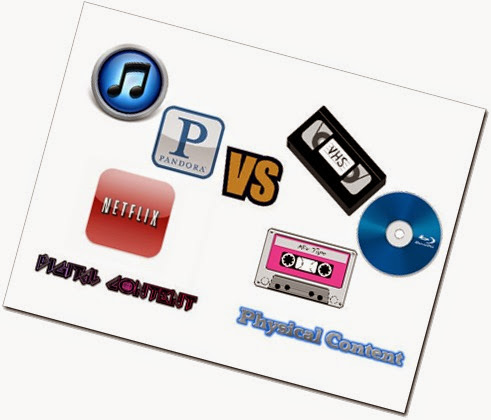
Digital Media Vs Physical Media – Are We Ready To Make The Switch?

  • Digital Vs Physical
  • Data Caps
  • Bandwidth Throttling
  • Internet Speed and Prices
  • Internet Reliability
  • Hardware Reliability
  • Storage Requirement And Availability
  • Cloud Service
  • Hackers
  • Content Providers
The truth? No. We are not ready for an all digital media environment. It doesn’t take a genius to understand why we are not ready based on the reasons above.

Data Caps

If there is one thing we all know is that most ISPs love to put data caps on their customers. Some, like Comcast offer huge monthly data caps of 300 GBs (with an extra charge for ever 50 GBs after that), an amount that some would think is a lot but believe me, its not when you are downloading games that are as high as 25 GBs on your PC or gaming consoles. Then there is HD content, movies that exceed several GBs in size that are streamed thru services like Netflix and Hulu. And what about music? Radio stations are slowly being replaced with services like Pandora, Spotify and the newest players Google Music and iTunes Radio, all streamed online. You’d be amazed how much bandwidth these eat up and how many GBs you will go thru if you listen to music often. Take into account all of this plus your daily browsing, Youtube videos, email attachments and mix that with all your devices that access the Internet these days thru your WiFi network (cellphones, tablets, gaming consoles, PCs, TVs, media boxes, toys, appliances, A/C controllers, VoIP phones, etc) and you can easily see how small 300 GBs seems when you reach it before the next month rolls in. There are other ISP’s that have even lower data caps such as AT&T who imposed data caps of 150 GBs to their DSL customers.

Bandwidth Throttling

If data caps are bad enough we also have to deal with throttling (slowing down your service on specific sites or programs instead of providing the speeds you are paying for). AT&T and Comcast have been known to do this a lot. A quick search on Google shows AT&T and Comcast throttling Youtube and even torrents. Imaging having to wait days for a game to download when you should have gotten it faster because of the speeds you pay for? That would suck big time but its down all the time because these ISPs don’t want people to take advantage of them and thus make them lose money in some way.

Internet Speed And Prices

Thanks to Google’s Fiber Internet many ISPs have been forced to provide faster services at cheaper speeds in order to stay relevant as Google Fiber slowly (painfully slowly) makes it way into American homes but even then we still not only lag behind the rest of the world in Internet speeds but ISPs actually claim that they don’t provide it because they think we don’t need it. We all know its not about what we want but about them finding ways to make money off higher speeds. They know most people won’t pay a premium for really, really fast Internet so they simply raise the speeds a little every year and call it “we gave you a speed boast for free” promotions. But, what’s the point of speed if they still cap and throttle you? Some ISPs still charge an arm and a leg for faster speeds in some areas and some don’t even offer faster speeds. And then there are those who don’t even have Internet yet because they live in remote places where their only options is satellite Internet (unreliable, expensive and slow) or mobile Internet (also unreliable, expensive and slow).

Internet Reliability

Data Caps, Bandwidth Throttling, Internet Speeds and Prices, none of that matters if your service in unreliable. Many out there made a big stink over MS’s 24 hour check in requirement for the Xbox One before MS decided to do a 180 on this and it made sense because not only are Internet services not reliable today they are not everywhere either. Some argued that this feature was no big deal and that people shouldn’t complain but in reality it’s a valid argument. Every time a storm passes where I live both Internet and power are disrupted. Power usually comes back fast, but ISPs are not as quick to react. More often than not my Internet drops for no apparent reason and sometimes when for days without a fix. Unfair when your system would have required a check in every 24 hours unlike other similar services that could go for weeks before requiring a check in.

Hardware Reliability

Remember the red ring of death the Xbox was known for? These days people still have hardware issues that can easily prevent them from enjoying their content. All it takes is for your hard drive to fail and all the digital files you downloaded need to be downloaded again once you are able to change the drive or replace the entire system. Routers and modems also break from time to time thus preventing you from downloading any new digital content.

Storage Requirement And Availability

This can also be another issue. These days most people don’t see it because physical media is still available to consoles (not so much on PCs) but once you start filling up your hard drive with massive games that take up several GBs each you’ll start to notice the limitations. To make matters worse changing hard drives on current systems is no piece of cake and next gen console apparently are even worse. Add the fact that to get more space you gotta pay up the ying yang for a bigger drive on consoles and storage space becomes a problem. On a PC its easy, you add more drives or backup the current drive and replace it with a bigger one and restore the OS and software. But not everyone is tech savvy enough to do this and hard drives are still a tad bit expensive, especially if you want an SSD for the speed.

Cloud Service

Cloud services are still in their infancy. They depend on the speed, reliability and hardware you have in order to function properly. They are also expensive in some cases. Netflix is pretty cheap but lacks a lot of content because some networks simply refuse to share their content thru streaming (because of greed). However storage sites like Google Drive, Dropbox and even iCloud are expensive because they are based on the amount of GBs you want or need to store your digital content. Bare in mind this service also affects the data caps. This will definitely be the key to the switch to digital content but for now they are too restricted, expensive in some cases and don’t always provide that much content.

Gov’t And Hackers

And then there are Gov’t and hackers. Time and again we see stories about hackers accessing peoples private content, damaging systems and causing all kinds of havoc. Losing access to your digital content thanks to hackers would really suck. But just as bad is a Gov’t who is determined to gather every piece of data on their citizens and in some cases without their citizens knowing it (NSA, The Patriot Act, President Obama). Last thing you want is to have it all digital thus making it easier for the Gov’t to get it all and know it all in a moment.

Content Providers

But the biggest problem are the very people providing the content. All it would take is for Steam, MS or Netflix to believe you are breaking the ToS in some way and you will be locked out from all of your content even though you paid for it and its legitimately your (in most cases) because in order to use it you have to access their services which they can block.

In the end thanks to greed from the hardware developers and ISPs we are not ready because we still have too many obstacles to get passed before we can stop wasting money on disks for music, movies and games. Having the physical content handy can help prevent any of these issues from hurting you because you have it in your hands and unless you lose it or break it you can use it when ever you want. You can even sell it and get a few bucks back and money back is always good.

This can also spell disaster for our economy as many companies will go the way of the dinosaur like Gamestop and F.Y.E., brick and mortar stores that sell physical games, movies and music. Several other stores like Walmart, Best Buy and Target will have to eliminate their music, movie and video game sections. Eve local movie and video game rental stores like Redbox, Blockbuster and GameFly would go out of business, in part anyways. We are already suffering from unemployment and a weak economy.

It just doesn’t seem like we are ready for the change just yet even though PC gaming has mostly moved to a digital content platform for video games and Netflix is almost becoming a cable cutting alternative to cable TV.

What do you think? Are we ready to go all digital? Do you think Microsoft should have stuck to its guns and focused on moving towards a more digital platform or is Sony right that people still prefer physical content over digital?

This article was inspired by the story linked below.

http://www.maximumpc.com/article/news/through_sonys_eyes_vast_majority_gamers_prefer_gamestop_over_buying_online2013

@@@@@@@@@@@@@@@@@@@@@@@@@@@@@@@@@@@@@@@@@@@@@@@@@@

Thanks for reading. Please feel free to leave a comment below about your thoughts on this. +1 it if you liked it. Share it if you’re inclined. Much appreciated.  :+D

Chatterbox Chuck

Tuesday, June 25, 2013

When Your Bookmarks Get Out Of Control, Its Time To Call In The Bookmark Sentry To Bring Order To Chaos


Enhancing Your Internet Experience

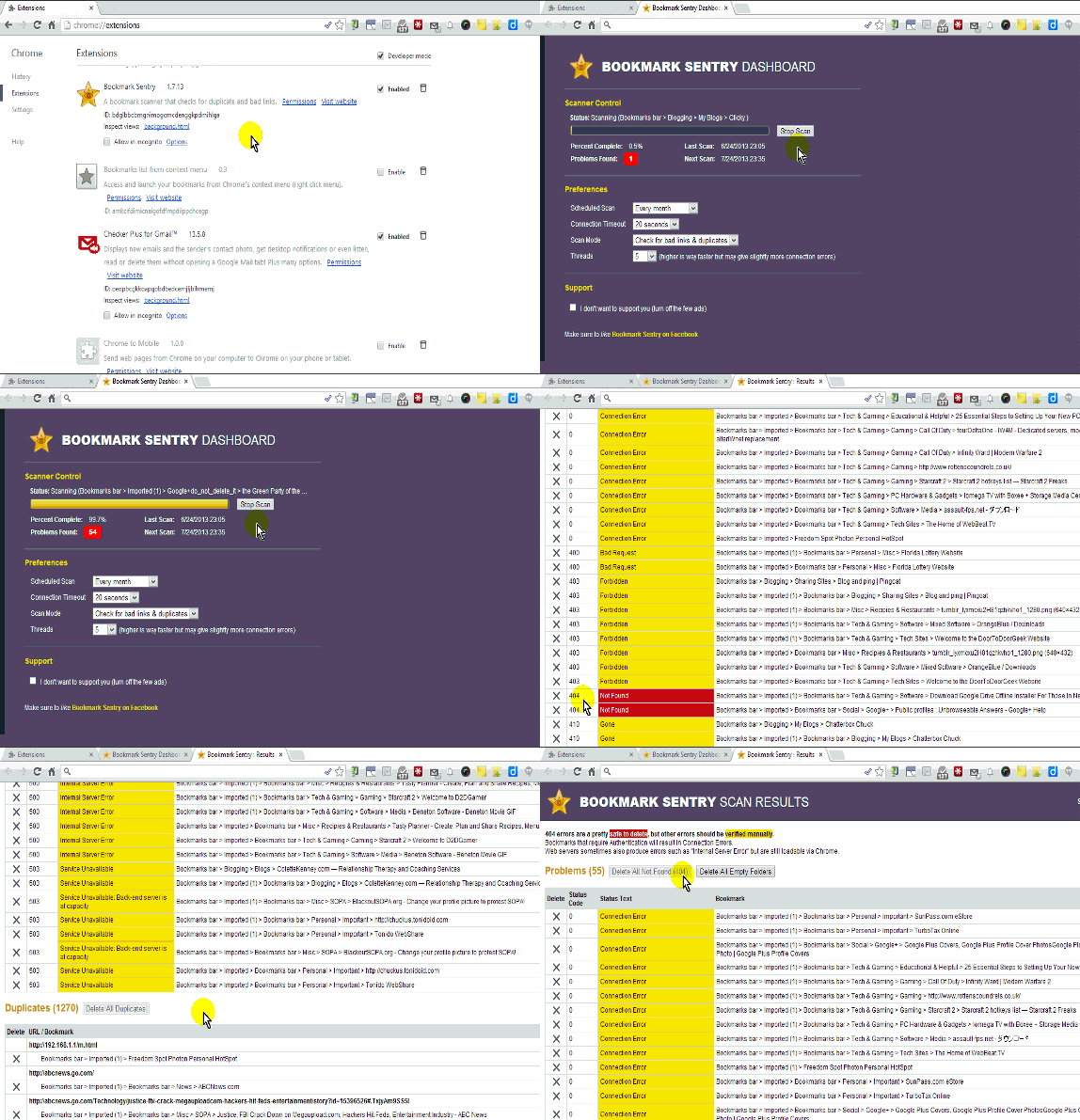
If you’re like me you likely have a huge collection of bookmarked websites that you try your best to keep neatly organized but sometimes its gets hard to keep track of what sites you already have bookmarked and which ones still work. To make matters worse while Chrome is an excellent browser with the ability to sync your bookmarks to across all your Chrome browsers with the same login, more often then not I have noticed that Chrome can duplicate your bookmarks making your organized collection bigger and more cluttered thus hampering your ability to find what you are looking for. But fear not my friends I have an extension that can help you fight back against duplicate and broken bookmarks to bring order back to chaos, a la Borg style.

Bookmark Sentry http://goo.gl/8rR5E

This extension will will go thru your entire bookmark collection on Chrome to search for duplicate links, “not found” bad links (404 errors) and even links that may have issues that you may want to update. Just go to the settings page on Chrome and then to extensions section and click the options link under the Bookmark Sentry extension to run it. The UI gives you an “anti-virus” like scan and starts counting the number of errors as it finds them. Bare in mind not every error it finds is actually an error. You have to take into account that a site may be down or unreachable at the time of the search and you also have to be sure you are on an open network when doing this scan because if the network has restrictions such as blocked sites and filters some of the results can come up as connection errors or blocked so take that into account before considering deleting the link.

After the scan is done a tab will a list of the errors will open with a list of all the errors the scan found. The top section shows all the links that the scan could not connect to separating them by type of error such as Not Found and Connection Error. A color coded system makes it easier to see what type of error they were. Next to each error is an X for you to delete the link if you want to. A button at top each section gives you a single click option to delete multiple links such as All Not Found (404) links, All Empty Folders and even All Duplicate Links.

 Those errors in yellow should be reviewed with caution because, as I stated above, these may simply be connection problems due to the network and not the website.

Although the duplicate section has a Delete All Duplicates button I would suggesting reviewing these manually as sometimes you may have duplicate links in different folders for personal reason and you may want to make sure the extension doesn't delete both links by accident.

One extra feature is the Scheduled Scan preferences that allow you to set the days the extension can auto scan and what to scan for such as bad links, duplicate links or both. You can also set how long to test a page before determining a error status thus allowing for more accurate scan. There is even the added bonus of choosing to support the extension developer by choosing to hide ads or not.


@@@@@@@@@@@@@@@@@@@@@@@@@@@@@@@@@@@@@@@@@@@
Thanks for reading. Please feel free to leave a comment below about your thoughts on this. +1 it if you liked it. Share it if you’re inclined. Much appreciated.  :+D
Chatterbox Chuck