

Showing posts with label tips. Show all posts

Wednesday, April 10, 2013

Google+ Photo Album Limitation And How To Work Around It

I’m a big fan of Google+, its my main social network site because I am not a big fan of Facebook. Too boring for my style. But, there comes a time when even I have to accept that Google+ is not perfect. :+(  It seems that Google+ has one flaw that most people may not be aware of but will eventually stumble upon once they reach that point when Google tells them they can no longer upload images to share.

Considering Google+ is strongly oriented towards sharing photos and has a huge photography community plus seeing that many of Google’s features are based around photos (animated profile pictures, large animated cover photos, photo tagging, emotion icons for photos, full size images, text on photos for easy memes, photo only searches, unlimited photo space when uploaded thru Google+ and more) its hard to understand why such a limitation exist.

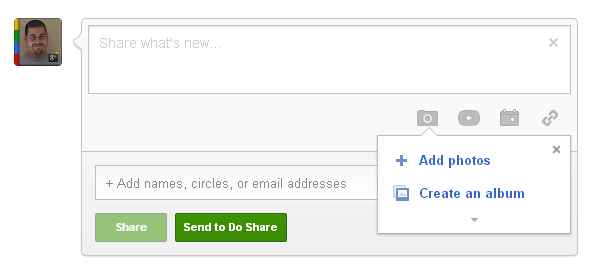
What limitation? Well, when you upload images to share on Google+ these images are saved in an album called Photos from posts in your photo section of your Google+ profile. What is really strange is that every post you share with an image (links don’t apply) creates a folder within this Photos from post album. If you share several images or one in a single post, they will all be inside one folder within this album on folder for each post you share. You’re probably still wondering what the problem is. Well, this Photos from posts album (and every other album you create) has a limit of 1000 folders and/or images. Once you reach this limit you will no longer be able to share images to Google+ thru the share box on your stream or profile page, not without deleting some of the images from this folder first, most preferably older ones. Keep in mind deleting images you shared automatically deletes the post as well. I personally would like to avoid deleting any of my posts.

Image from Panah Rad G+ profile

Now, I know 1000 sounds like a lot of photos. I mean who shares 1000 photos right? Well, you may want to expand your idea of what kind of photos are being shared. I’m not just talking about photos of yourself, photos of trips that you take, of interesting or strange things you take pictures of or even photos of landscapes and animals. I’m talking about those meme images you share, those pictures of celebrities and cars you like, even those photos of posters, jokes, strange inventions, quotes and your religious beliefs. All these count towards that limit even if you save these photos in an album before you share them because Google+ will add the image to the Photos from posts album even if the images are already in one of your albums with one except which I will explain later in this article. While 1000 sounds like a lot you’d be surprised how quickly you can reach that limit if you dedicate a lot of time sharing stuff on Google+, especially if you use one of the tips and trick recommendations on how to share posts properly for more attention and interaction that many Google+ pros teach like this one How to write a Successful Google+ Post.

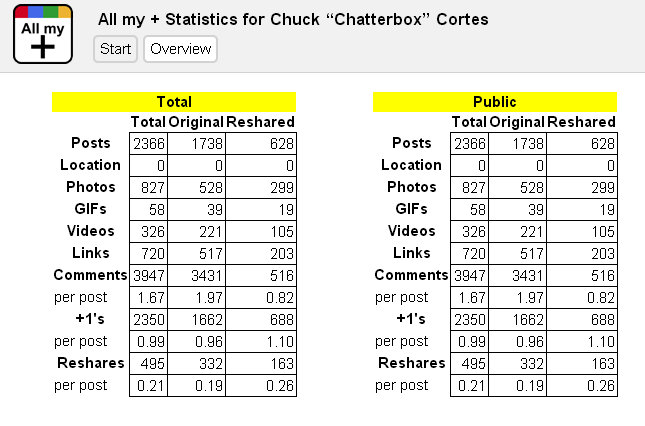
To give you an idea of just how easy it is to reach this limit I did some research on my own activities on Google+ since I joined back in July 2011 and so far, based on my http://www.allmyplus.com statistics I have made around 1738 posts of which 527 images were shared meaning I have already reached the half way mark on this limitation. And while I am very active on Google+, I am not as active as other people I follow who post an average of 5 to 10 posts per day most with images attached. I have already seen one fellow Plussian find himself in this bind being forced to delete old images in order to make space to be able to continue to share images and also a Google+ Page that was forced to create a second page in order to continue to share posts with images because they too had reached this limit.
However my fellow Plussian +Panad Rad found a small workaround that can help avoid this limitation in a way and I would like to share it here but let me warn, this workaround takes a few extra steps in order to share a post with an image and requires you to ignore using the share box on your stream and profile page to share images to avoid adding photos to the Photos from posts folder. If you are willing to do the extra leg work here’s how you do it.

The first step is to create a new album so head on over to your Photos section.
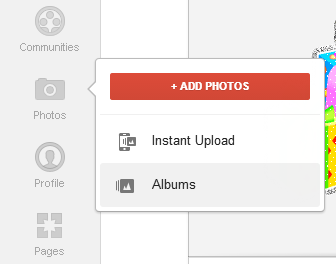
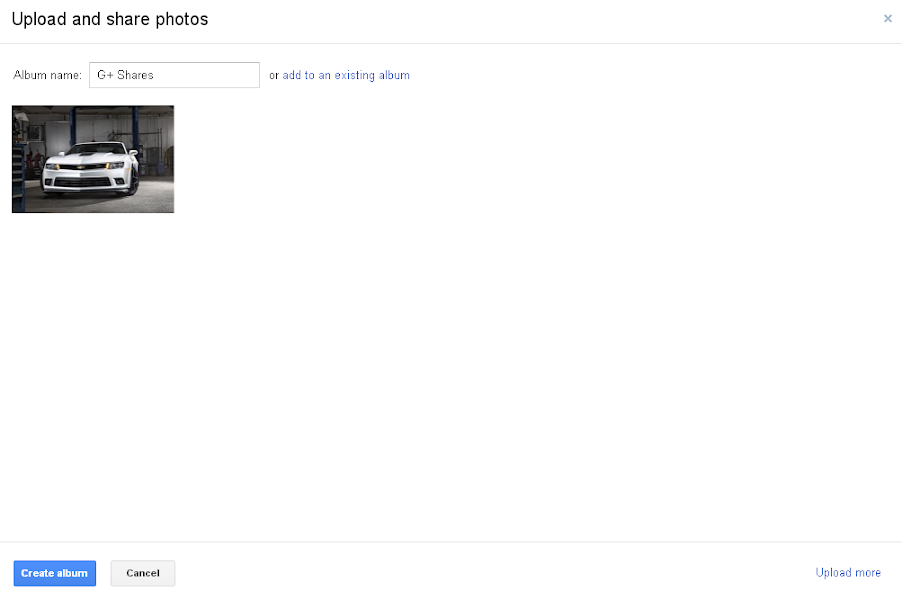
You’ll need to pick an image you want to share to create the album. I choose a beautiful picture of a 2014 Chevy Camaro to share. Click the Upload New Photo button and then add the image.
Change the album name to what ever name you want to call this album to make it easier to find. I choose G+ Shares. Then click the create album button at the bottom.
Once the image is uploaded to the new album Google+ will quickly give you the option to share the newly uploaded image to your stream. This is where you have to share the post in order to avoid the image being added to the Photos from posts folder and thus avoiding the limitation. Add your comments, select who to share this with and share like you normally do and voila the image will remain in this folder.

Bare in mind, its a must that you share the image from this pop up share box. If you choose to upload images to share later, once you try to share the image it will automatically add the image to the Photos from posts album and it makes this workaround pointless. Remember this applies to any photo you uploaded to an album in your photo section. If you share it after it was uploaded as opposed to the moment it was uploaded it will affect the limit of your Photos from posts album.
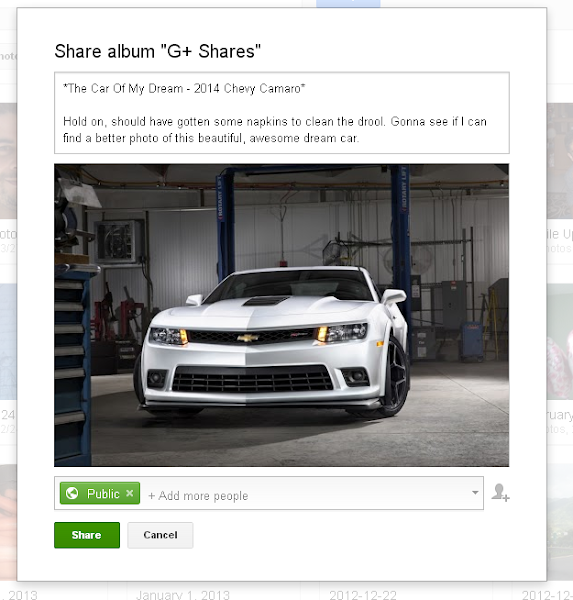


To verify this worked go back to your Photo section and look at the new album you created and compare it to the Photos from posts album and you should notice that the image you just shared is only found in the new folder you shared it from and not in the Photos from posts album.
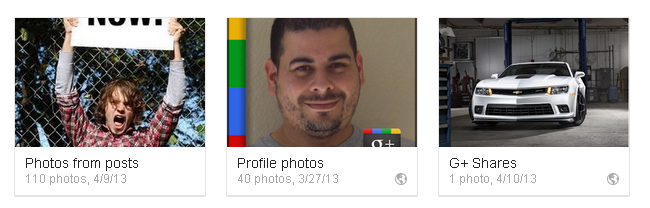
So long as you avoid sharing images by adding them directly to the share box from your stream or profile page you won’t have to worry about reaching the limit and having to delete old images to make space which, as I mentioned before, will also delete the posts the images were shared on. Of course like the Photos from posts album every album in your photo section has the same limitation. The difference is if you reach this limit you can always create a new album and continue to upload and share from there without having to delete old images to make space. Keep in mind that Google+ gives you unlimited photo storage so long as you upload thru Google+, these images do not affect the cloud storage space Google gives you for Drive/Picasa with the exception of images that exceed the size limit for images. Google+ recently added the ability to upload full resolution images but bare in mind these will affect you storage space even if uploaded thru Google+. I have 5 GBs free Google Drive cloud storage.
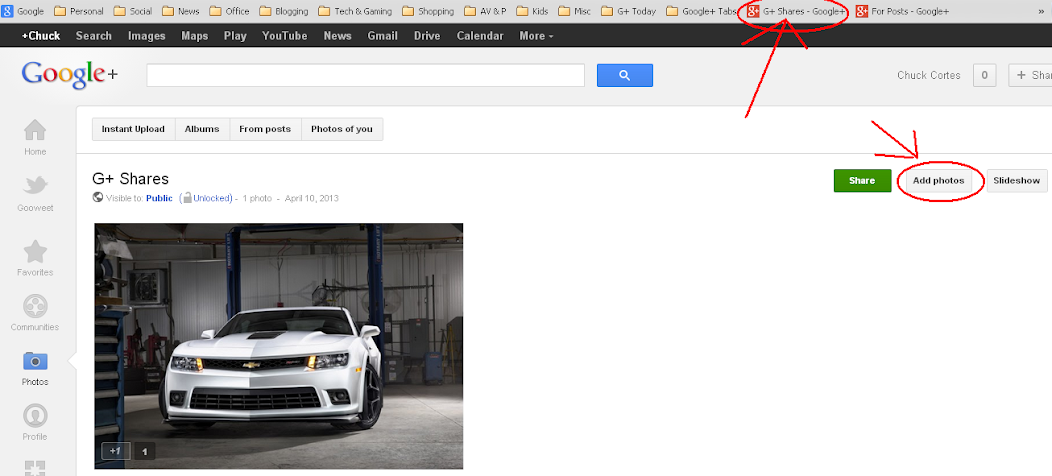
As an added tip to make it easier to upload images to share. Rather than going thru the photo icon on your main page to access this new album and upload a new image to share, depending on your browser of choice, bookmark the album so you can easily access the album as opposed to going the long way. I added a bookmark to my bookmark toolbar on my Chrome browser where I can directly access the album, click the add photo button and upload the new images to share. Just remember to share the image as soon as you get the pop up share box as I explained above and you should be good to go.
 

I know this is a bit more time consuming and requires extra steps and that using the share box Google+ gives you on your stream and profile page is easier and its true but this is simply meant to be an alternative workaround to avoid the limitation Google+ photo albums currently have, especially the Photos from post album that is default for Google+ and cannot be changed. Hopefully Google looks into this and makes some changes to allow either more images in an album or to change where the images are saved when shared. I posted this issue on the Google+ Discuss community here and hope they see it and take it into consideration.

I hope this little workaround helps. If you want to know how close you are to this limit just go to your Photos from post album and check out how many images you have in there or you can go to http://www.allmyplus.com, sign in with your Google+ account and look at how many photos you have shared, don’t count the ones you reshared.

If you have any comments or questions of have an alternative of your own please feel free to reply on my Google+ post for this article by clicking on the image below. Thanks.

Friday, July 30, 2010

How often do you “Share This”?

Image from thedigeratilife.comIt’s kinda ironic how hard I worked to add social networking buttons on to my old  blog at charles.joeuser.com, a site that is very restrictive about scripts in their articles yet I myself don’t normally click on these same buttons when I visit other peoples sites. Well, that was until recently when I realized how useful they could be, which is why I wanted them, yet how could I expect anyone to want to click on my buttons and share my articles with the rest of the Internet world when I didn’t do it myself. After all I tend to believe that if I would be willing to do or not do something that it’s likely that the average person is also willing to do or not do something.

This is when I started to wonder just how often do people click any of the “share this” buttons found on just about every website I have seen so far. I mean, not until this past few weeks did I actually use these social networking buttons to share articles on blogs that I have been discovering lately. I can only assume that the reason I didn’t use these buttons before was because although I had the accounts, I never actually used my Twitter or Facebook and I didn’t even have accounts on Delicious, StumbleUpon, Digg, or Reddit. Heck, I didn’t even know how to use Google Buzz even though I had access to it thru my email.

But as I started doing research on how to expose my articles to the masses, I started understanding how these buttons worked and how in order for my stuff to get exposure I had to also expose things that I found as well. It’s kinda like the guy who gets to eat from food everyone else but him bought. He benefits from the food but does not contribute. But if less and less people contribute and more and more benefit without contributing, then the end result changes and everyone loses. That’s why we all have to work together and help each other out. A similar concept should be applied to politics but that is more of a pipe dream.

Although my Facebook friend list is pretty big in my opinion (considering I am not good at making friends) I am not one of those people that gets followed often, probably because I don’t do Facebook much. To be honest my life is not actually exciting enough right now to have some daily update to post, not to mention this is not something I actually look forward to doing, so the people on my list don’t actually see my picture and comments on their Facebook feed or walls often so I am sorta one of people that gets lost in the endless “what’s on your mind?” post. Still, every time I post an article I use sites like TwitterFeed to advise those on my list a new article has been posted on my blog in the hopes someone gets interested. This in turn may get then to “Retweet”, “Buzz”, “Digg”, “Share” and/or “Submit” my articles for others to find.

Still, I can’t help but wonder, the people who do visit, read and maybe even comment on my blog, how often do any of them hit the buttons? I do have a stats widget that allows me to keep track of how many people visit my site and how many people view particular articles and most of my social networking buttons have a counter so I could get a general idea but it doesn’t tell me if the same person either clicks everywhere they go, don’t click any buttons at all or clicks on the buttons depending on his or her feel for the article. All these curiosities are probably pointless to some but I am a very curious person and sometimes I just need to about know that which I find curious.

My blog is fairly new and my readership is at a minimum right now but the more I read, the more I learn and if there is one thing I have learned is that, like in everyday life, helping to spread other peoples words on the Internet by clicking on their social network buttons will be beneficial to my mission of exposing my words to the Internet masses. So please, if you find something online you deem worthy of other peoples eyes, share it, click those social networking buttons. Be part of providers not just the users.  Share the love, share the articles, but most of all, share my words with everyone else by clicking on the social networks button to the left that have been following you as you read. Thanks.


All Comments are subject to this blogs Comment Policy. Did you like this article? Please remember to share this article with family, friends and the rest of the world thru the links below. Follow me on Twitter for updates on my blog. Thank you for reading and commenting on another excellent article by yours truly Chatterbox Chuck.

Thursday, July 22, 2010

The Road from Blogger Novice to ProBlogger Chronicles – Grammar & Spelling woes

Photobucket
Sometimes I think I can be considered the least likely person to be a blogger. Why? Well, let’s see:
  • I’m not much of a reader – When it comes to books, I’m not a reader. I was somehow able to get thru Middle and High school without reading more than a few pages in the beginning, middle and end of any book one of my teachers gave us for some kind of book report. I do enjoy some magazine articles and now find myself enjoy blogs all across the Internet, but even the Harry Potter series was read to me thru an audio book.

  • I’m not much of a writer – If I have written a couple of letters to anyone in my life it’s a lot. I rather make phone calls then write a letter. Ironically you would think emails being so much easier would make a difference but I use emails as often in a week as the average person showers in a week. With the exception of my job which I have no choice in the matter but 98% is work related emails. Oddly enough I like writing my articles and also enjoy commenting on other peoples blogs. Strange isn’t it?


  • My typing skills are funky – I’m a 2 finger writer. I use my Index Fingers for most of my typing and have gotten pretty good at it, but at the same time it has made learning to type properly almost impossible. Not to mention I tend to make mistakes a lot because I write letters in the wrong positions as oppose to misspelling. For example I tend to write “atxes” a lot as oppose to “taxes” on my job emails. Don’t know why but it happens almost every time. Thanks to the spelling feature on Outlook I catch it every time but still. I also have issues with capital letters; because I only use 2 fingers I can’t cover the entire keyboard without moving both hands at the same time so by the time I press the letter i want capitalized I may have already moved the finger that was on the shift button and so the letter fails to be capitalized which I then have to fix later after reviewing. Maybe someday I’ll learn to type properly.

  • My spelling can use some improvement – I am so totally dependent on spell check software in all the websites and software I use. My 2 finger typing doesn’t help either. English was not exactly one of my favorite subjects in school so in all honesty I still have issues spelling certain word just by hearing them. I sometimes have to read the words in my mind the way I see the letters just to remember how to spell certain words. Ironically I am really good at catching spelling errors in other people’s comments and articles. Of course it’s not my business to point these out as I have seen and learned myself that people don’t like to have their spelling errors pointed out.

  • My grammar is barely existent – Like my spelling, my grammar is just as bad if not worse. Punctuation is like Chinese to me. I often struggle to figure out when to use a semi-colon or a comma even though I understand the difference. Or how often to use comma’s in a sentence as oppose to a point and start a new sentence. This is why I am so picky with my articles and although I am not perfect I still try to avoid making grammar mistakes and making my article seem like certain parts don’t make sense when reading it. I have seen this happen a lot on other peoples articles but tend to believe they probably have similar if not worse problems understanding English grammar. It’s actually a bit embarrassing to admit it as I was born and raised in the US and always had good grades in most of my classes with the exception of History which I found boring as a teen but am now more interested in it and am forced to research stuff I should already know.

Although all the points above give me the impression that I might be the weirdest blogger out there, somehow I am able to rise above these “short comings” and create some pretty interesting articles. Articles that make me wonder why I have these short comings at all. The good thing is the more I get involved in blogging, the more articles I write, the more research I do and the more I “measure twice and cut once” the more I improve on these short comings and perhaps someday I can see them as minor issues barely noticeable.
I doubt I will become an avid book reader eventually; I don’t think even a Kindle or Nook can change that; but at least audio books can fill some of that gap and I will have to settle for movie versions of some books which will always lacking compared to the books can still be pretty fulfilling.
That’s why I advise anyone who dedicates a lot of time to blogging and creating great articles to truly take your time reading, re-reading and feeling very comfortable with every article you create before posting. While most people may ignore these “minor errors” it can still take away a little bit of flare from the blog entirely if done too often. People may not voice it out loud but they might use it as a a con when talking about your blog to others. I know because I have been the victim of “grammar and spelling error police” of the blogging world.
So, are you picky about your grammar and spelling? Do you take your time creating and posting articles or do you write and post on the fly? Tell us your stories or success and not so successful postings where grammar and spelling was good or bad.

Enhanced by Zemanta